How to sort in Google Sheets
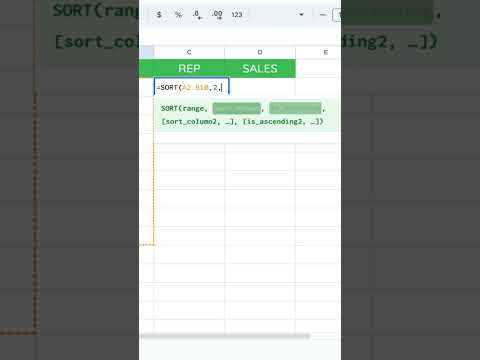
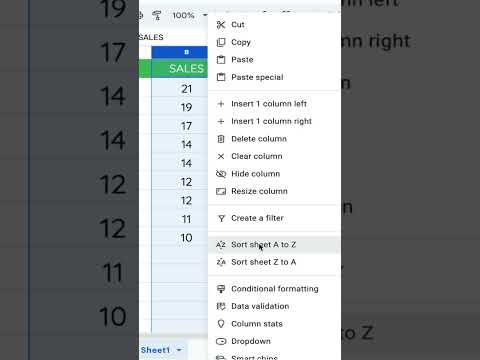
Select your data, then use Data → Sort sheet or Data → Sort range. Pick the column and A → Z or Z → A. For multi-column sorts, open Data → Sort range → Advanced range sorting options and add sort columns. Sorting changes the sheet in place. If you want a sorted view that stays linked to the source data, use =SORT(range, sort_column, is_ascending) on another sheet.
Steps
-
1
Select the range (or click inside the sheet for a full-sheet sort).
-
2
Go to Data → Sort sheet or Data → Sort range.
-
3
Choose column and direction.
-
4
Use Advanced range sorting options for secondary keys.
Related tutorials
These videos might help you go deeper on this topic.
Search Every Function in Google Sheets
The First Thing I Do When Starting a Google Sheet
Google Sheets Easter Eggs Beyond PRIDE
Scrape Google Maps
SearchLord: One Sheet to Search Them All
Related blog posts
Written guides that go deeper on this question.
Google Sheets Locales. What are they?
Hello, Better Sheet members and non-Better Sheet members! This tutorial is about every locale listed in Google Sheets. If you live in a country that is not well represented with blog posts or someone makes a blog post about a Google Sheets issue, they create a Google Sheet formula and then you copy and paste it into your sheet and it has the wrong delimiter. How do you resolve that? I'm going to show you how you can fix that and how you can know if there's a problem. Locales. What are the...
Read post →How to Use Google Sheets as a Website Database
Did you know you can use Google Apps Script to turn a Google Sheet into a free, auto-syncing database for your website? This guide shows you exactly how to set it up. You’ll prepare your spreadsheet, write a few lines of code and publish your site. Don’t worry if you’re not a developer, we’ll walk you through it. Why Use Google Sheets as a Database? For small projects, Google Sheets offers many advantages over traditional databases: * Free hosting and storage * Easy to edit data without...
Read post →Extract URLs from Google Sheets
Extract url from hyperlink google sheets.Skip the Command K. This Google Sheet tutorial will make it easier for you to extract URLS from Google Sheets.
Read post →Better Sheets on YouTube
Watch matching videos from youtube.com/bettersheets.

Terms and formulas behind this
Want the full definition or how a formula works? Start here.
sorting data in Sheets
Sorting reorders rows by one or more columns. The Data > Sort range menu sorts selection in place. The SORT function ...
Open →SORT
SORT reorders rows from an input range and spills the result elsewhere. Source data stays put, unlike Data > Sort ran...
Open →COLUMN()
Google Sheets COLUMN() function guide
Open →COLUMNS()
Google Sheets COLUMNS() function guide
Open →SORT()
Google Sheets SORT() function guide
Open →Related questions
How to sort data on Google Sheets
Select your data, then use Data → Sort sheet or Data → Sort range. Pick the column and direction. Advanced range sorting options let you add secondary keys. Sorting changes the sheet in place; =SORT(...) builds a sorted spill range elsewhere.
Get the answer →How to sort data in Google Sheets
Select your data, then use Data → Sort sheet or Data → Sort range. Pick the column and direction. Advanced range sorting options let you add secondary keys. Sorting changes the sheet in place; =SORT(...) builds a sorted spill range elsewhere.
Get the answer →How do i sort data in Google Sheets
Select your data, then use Data → Sort sheet or Data → Sort range. Pick the column and direction. Advanced range sorting options let you add secondary keys. Sorting changes the sheet in place; =SORT(...) builds a sorted spill range elsewhere.
Get the answer →How do you sort data in Google Sheets
Select your data, then use Data → Sort sheet or Data → Sort range. Pick the column and direction. Advanced range sorting options let you add secondary keys. Sorting changes the sheet in place; =SORT(...) builds a sorted spill range elsewhere.
Get the answer →How to sort google sheet
Select your data, then use Data → Sort sheet or Data → Sort range. Pick the column and direction. Advanced range sorting options let you add secondary keys. Sorting changes the sheet in place; =SORT(...) builds a sorted spill range elsewhere.
Get the answer →How to sort columns in Google Sheets without mixing data
Select your data, then use Data → Sort sheet or Data → Sort range. Pick the column and direction. Advanced range sorting options let you add secondary keys. Sorting changes the sheet in place; =SORT(...) builds a sorted spill range elsewhere.
Get the answer →Need more than a quick answer?
Membership unlocks 636+ tutorials, unlimited generators, and every template.