Pillar calendar layout in Google Sheets
Month grid on top, vertical day list below. Plan the month at a glance, then write notes down the pillar. Included free in Big Year.
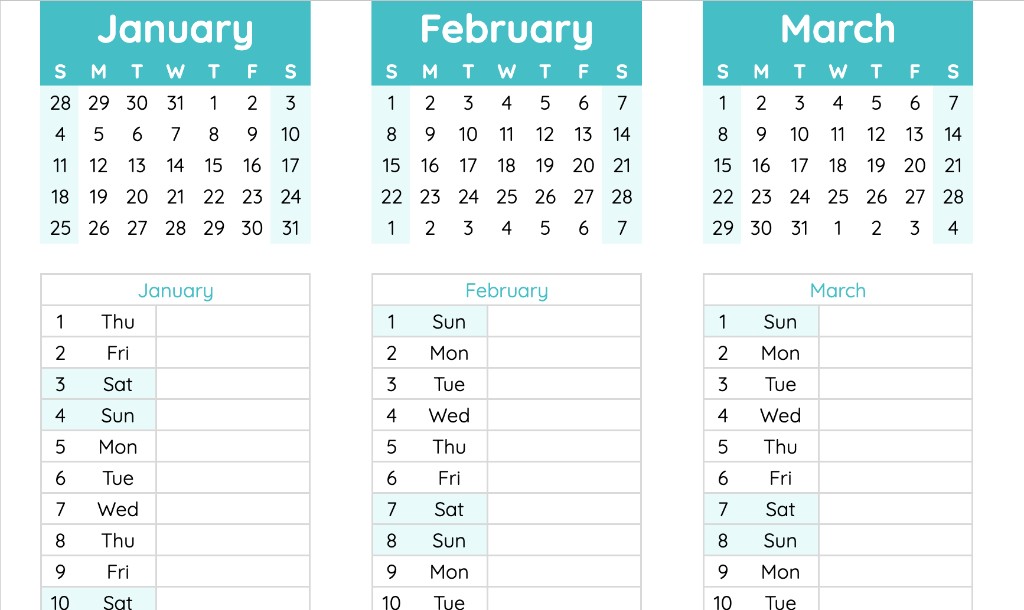
Month overview plus a fillable day list
The PILLAR tab stacks a classic month grid above a vertical day list for the same month. Scan dates in the grid, then write plans, deadlines, and notes down the pillar. Weekends stay highlighted so trips and rest days pop.
- Month grids for January through December
- Vertical list with date, weekday, and blank notes column
- PILLAR-WIDE when you want more horizontal room
Better than a standalone monthly PDF
Standalone month printables go stale when plans change. Pillar lives inside Big Year: edit once, holidays highlight from SETTINGS, print any month, and keep the full year on BIG or MINI.
- Link to the monthly planner hub for every month of 2026
- Share one Google Sheet with family or your team
- Eight layouts in one free file
Who Pillar is for
Freelancers mapping client deadlines, parents tracking school events, and anyone who wants month detail without losing year context.
- Monthly planning inside a free yearly Google Sheets calendar
- Desk print from MINI or wall print from BIG alongside Pillar detail
- Pair with the weekly planner hub for day-column rhythm
Related
Common questions
What is the Pillar layout?
The PILLAR tab shows a month grid above a vertical day list with space for notes. Plan the month at a glance, then write down the pillar. PILLAR-WIDE gives more horizontal room.
Is Pillar a separate product?
No. Pillar is one of eight layouts inside the free Big Year yearly calendar for Google Sheets.