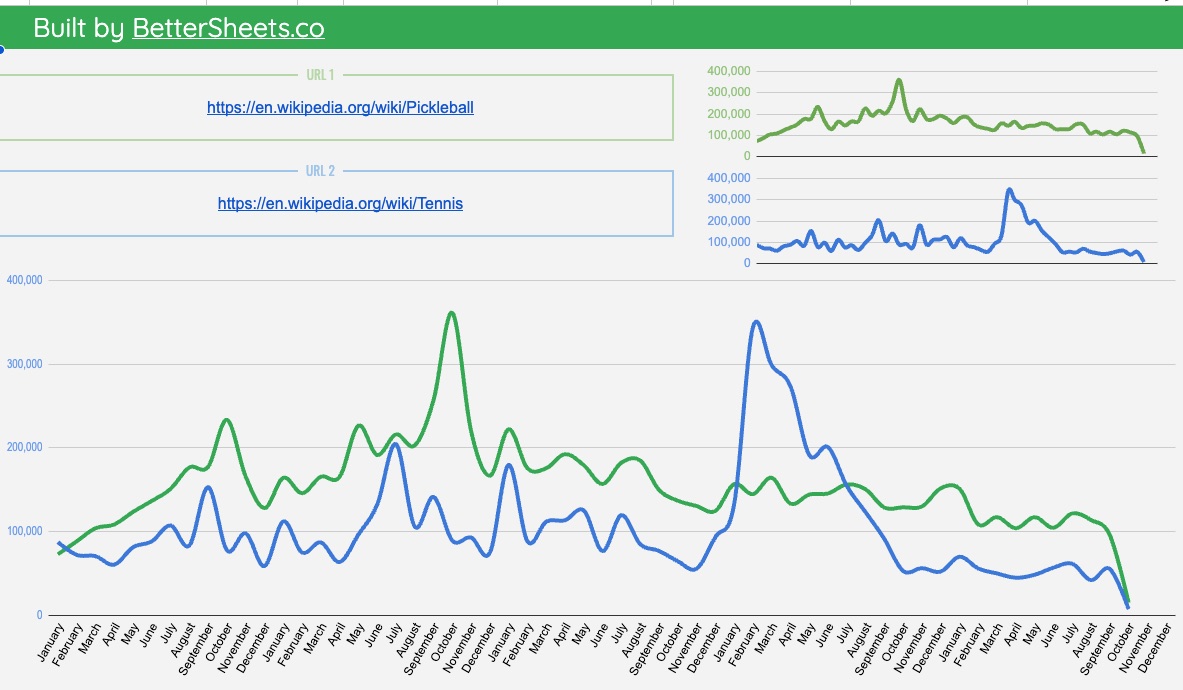
Wikipedia has a free API. It gives you pageviews of any Wikipedia page for any month. I made a Google Sheet that charts the last five years of any two pages, with real numbers and shows you a comparison chart.
See real trends with Wikipedia's free page view data
Copied by 117 people.
Wikipedia Trends Tracker by BetterSheets.co
Built by BetterSheets.co
Wikipedia Trends Tracker by BetterSheets.co
Built by BetterSheets.co
Wikipedia Trends Tracker by BetterSheets.co
Built by BetterSheets.co
Wikipedia Trends Tracker by BetterSheets.co
Built by BetterSheets.co
Wikipedia Trends Tracker by BetterSheets.co
Built by BetterSheets.co
Wikipedia Trends Tracker by BetterSheets.co
Built by BetterSheets.co
Wikipedia Trends Tracker by BetterSheets.co
Built by BetterSheets.co
Wikipedia Trends Tracker by BetterSheets.co
Built by BetterSheets.co
Wikipedia Trends Tracker by BetterSheets.co
Built by BetterSheets.co
Wikipedia Trends Tracker by BetterSheets.co
Built by BetterSheets.co
Wikipedia Trends Tracker by BetterSheets.co
Built by BetterSheets.co
Wikipedia Trends Tracker by BetterSheets.co
Built by BetterSheets.co
Wikipedia Trends Tracker by BetterSheets.co
Built by BetterSheets.co
Wikipedia Trends Tracker by BetterSheets.co
Built by BetterSheets.co
Wikipedia Trends Tracker by BetterSheets.co
Built by BetterSheets.co
Wikipedia Trends Tracker by BetterSheets.co
Built by BetterSheets.co
Wikipedia Trends Tracker by BetterSheets.co
Built by BetterSheets.co
Wikipedia Trends Tracker by BetterSheets.co
Built by BetterSheets.co
Wikipedia Trends Tracker by BetterSheets.co
Built by BetterSheets.co
Wikipedia Trends Tracker by BetterSheets.co
Built by BetterSheets.co
Wikipedia Trends Tracker by BetterSheets.co
Built by BetterSheets.co
Live Wikipedia page views, human readers, Oct 2021–Sep 2026
Yes, I just built a Google Sheet template on top of a free API. So you don't have to.
-
1. The data
Wikipedia counts every page view. Its API gives them out for free.
See the raw dataPickleball, Sep 2026: 82,765Pickleball, Aug 2026: 98,480Pickleball, Jul 2026: 108,388 -
2. The work
I hooked it up to a Google Sheet. No code. No API key.
https://en.wikipedia.org/wiki/Pickleballhttps://en.wikipedia.org/wiki/Tennis -
3. The result
Paste two links. Get five years on one chart.
How the Wikipedia API works
It's just a web address. Change the parts, open it, get the numbers.
The URL
https://wikimedia.org/api/rest_v1/metrics/pageviews/per-article/en.wikipedia/all-access/user/Pickleball/monthly/20211001/20260930
- en.wikipedia
- Which Wikipedia. en = English.
- all-access
- Desktop and mobile together.
- user
- Human readers only. Bots are left out.
- Pickleball
- The page. Same as the end of its Wikipedia link.
- monthly
- One number per month (or daily).
- 20211001
- Start date.
- 20260930
- End date.
What comes back
{"items": [
  {"article": "Pickleball", "timestamp": "2021100100", "views": 97993},
  {"article": "Pickleball", "timestamp": "2021110100", "views": 77808},
  ...58 more months
]}
One page at a time. One row per month. Raw JSON.
What my Google Sheet does with it
- Takes the Wikipedia link you paste and pulls out the page name.
- Builds this URL for the last five years.
- Fetches it and pulls the monthly views out of the JSON.
- Does the same for your second page.
- Lines both up month by month and draws the chart.
You paste two links. That's it.
This is the real sheet.
Not a mockup. Copy it to your Google Drive and paste your own two links.
Example comparisons
Some things you can compare. Each one shows live Wikipedia data. Click one to see the full chart.
You can use this for:
Content and SEO
Write about what people keep reading, not what spiked once.
Market research
Compare two brands, products, or niches before you pick one.
Competitors
See which competitor people look up more, and if the gap is growing.
School and reports
Real public data for a chart or a project. Five years, one tab.
Wikipedia isn't the only one. Lots of sites have free APIs. Here are a few I've already wired into Google Sheets for you.
Shopify Product Scraper
Put in any Shopify store's URL and get its products in a sheet.
Scrape a webpage
Pull data from a web page into Google Sheets in two minutes.
YouTube subscriber counts
Get any channel's subscriber count into a cell.
Movie data from OMDb
Pull movie details from a free movie API and plan a marathon.
ChatGPT prompt library
A searchable library of ChatGPT prompts, kept in a Google Sheet.
Chart your first comparison in two clicks.
Wikipedia's free API, already wired into Google Sheets. No code. Free.
FAQ
What is a trend tracker?
A trend tracker measures how interest in a topic changes over time, so you can tell a real trend from a short-lived fad. This one is a free Google Sheet: it pulls five years of monthly Wikipedia page views for any two topics and charts them side by side, using real reader counts instead of a relative score.
How do I see how many views a Wikipedia page gets?
Every Wikipedia article's views are public. On any article, open Tools → Page information to see the last 30 days. For history, Wikimedia's free pageviews API returns daily or monthly views back to July 2015. Paste the page link into this template and it charts five years of monthly views in Google Sheets for you.
Is the Wikipedia pageviews API really free?
Yes. It's a public API from the Wikimedia Foundation with no key and no signup. Wikimedia only asks that callers identify themselves and keep request rates reasonable.
Do bots count as views?
Wikimedia separates human readers from known crawlers and automated traffic. The live charts on this page count human readers only.
Does Google Trends show real numbers?
No. Google Trends shows search interest on a 0–100 scale, relative to the busiest point in the chosen time and place, not actual search counts. Wikipedia page views are real counts of people who opened an article, so you can say how many, not just how much more.
How do I check if something is trending?
Compare its interest over a long window, not just the last few weeks. Chart at least a year or two of monthly data: a trend keeps a higher baseline after each spike, a fad spikes and falls back to where it started. This template charts five years of monthly Wikipedia page views for that reason.
Is this the same as Google Trends?
No. Google Trends shows what people search, as a 0–100 score. Wikipedia page views show how many people actually opened an article, as real counts. Search spikes and sustained reading interest often tell different stories, so use both.
Why does a page's line suddenly drop to almost zero?
Usually the article was renamed. Views are recorded under each title, so a renamed page's history is split between the old and new names. Chart both titles to see the whole story. Our ChatGPT vs Claude chart adds both of Claude's titles together.
Can I compare more than two pages?
Yes. The template has a COMPARE TWO tab for head-to-head charts and a COMPARE THREE tab for three pages on one chart.
Do I need to code or set up an API?
No. Paste Wikipedia links, pick two, and the chart fills in. The template makes the API calls for you.
Is it free?
Yes. The Wikipedia Trends Tracker is a free unlock on Better Sheets.
By Andrew Kamphey, Better Sheets · Live data through September 2026, updated monthly
Want every template and tutorial? Become a Better Sheets member.
Need a custom research sheet? Consulting.